Saturday, 4 September 2021

Hardware and Software


Concept of Hardware and Software

Hardware

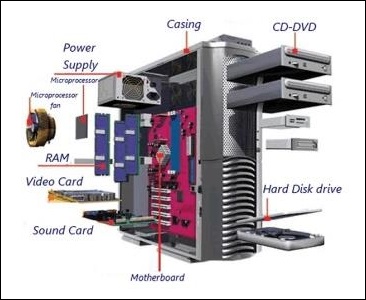
The term hardware refers to mechanical device that makes up computer. Computer hardware consists of interconnected electronic devices that we can use to control computer’s operation, input and output. Examples of hardware are CPU, keyboard, mouse, hard disk, etc.

Computer Hardware Components

Hardware Components

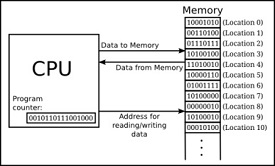
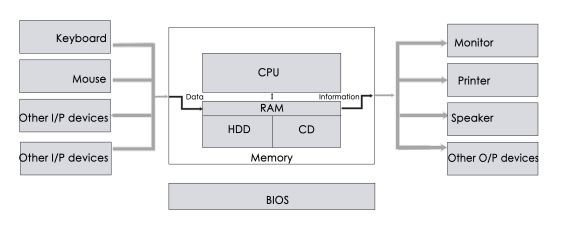
Computer hardware is a collection of several components working together. Some parts are essential and others are added advantages. Computer hardware is made up of CPU and peripherals as shown in image below.

Computer Hardware Architecture

Software

A set of instructions that drives computer to do stipulated tasks is called a program. Software instructions are programmed in a computer language, translated into machine language, and executed by computer. Software can be categorized into two types −

  • System software
  • Application software

System Software

System software operates directly on hardware devices of computer. It provides a platform to run an application. It provides and supports user functionality. Examples of system software include operating systems such as Windows, Linux, Unix, etc.

System Software

Application Software

An application software is designed for benefit of users to perform one or more tasks. Examples of application software include Microsoft Word, Excel, PowerPoint, Oracle, etc.

Differences between Software and Hardware are sorted out below −

Sr.No.SoftwareHardware
1It is a collection of programs to bring computer hardware system into operation.It includes physical components of computer system.
2It includes numbers, alphabets, alphanumeric symbols, identifiers, keywords, etc.It consists of electronic components like ICs, diodes, registers, crystals, boards, insulators, etc.
3Software products evolve by adding new features to existing programs to support hardware.Hardware design is based on architectural decisions to make it work over a range of environmental conditions and time.
4It will vary as per computer and its built-in functions and programming language.It is mostly constructed for all types of computer systems.
5It is designed and developed by experienced programmers in high-level language.The hardware can understand only low-level language or machine language.
6It is represented in any high-level language such as BASIC, COBOL, C, C++, JAVA, etc.The hardware works only on binary codes 1’s and 0’s.Computer Data Transfer
7The software is categorized as operating system, utilities, language processor, application software, etc.The hardware consists of input devices, output devices, memory, etc.

Friday, 3 September 2021

Internet

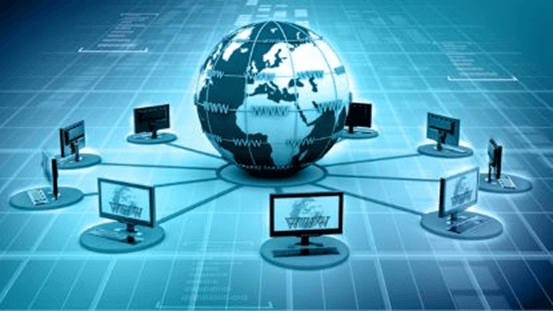
Internet is a global network that connects billions of computers across the world with each other and to the World Wide Web. It uses standard internet protocol suite (TCP/IP) to connect billions of computer users worldwide. It is set up by using cables such as optical fibers and other wireless and networking technologies. At present, internet is the fastest mean of sending or exchanging information and data between computers across the world.
Internet

It is believed that the internet was developed by "Defense Advanced Projects Agency" (DARPA) department of the United States. And, it was first connected in 1969.

Why is the Internet Called a Network?

Internet is called a network as it creates a network by connecting computers and servers across the world using routers, switches and telephone lines, and other communication devices and channels. So, it can be considered a global network of physical cables such as copper telephone wires, fiber optic cables, tv cables, etc. Furthermore, even wireless connections like 3G, 4G, or Wi-Fi make use of these cables to access the Internet.

Internet is different from the World Wide Web as the World Wide Web is a network of computers and servers created by connecting them through the internet. So, the internet is the backbone of the web as it provides the technical infrastructure to establish the WWW and acts as a medium to transmit information from one computer to another computer. It uses web browsers to display the information on the client, which it fetches from web servers.

The internet is not owned by a single person or organization entirely. It is a concept based on physical infrastructure that connects networks with other networks to create a global network of billions of computers. As of 12 August 2016, there were more than 300 crores of internet users across the world.

How does internet work?

Before understanding this let us understand some basics related to internet:

The internet works with the help of clients and servers. A device such as a laptop, which is connected to the internet is called a client, not a server as it is not directly connected to the internet. However, it is indirectly connected to the internet through an Internet Service Provider (ISP) and is identified by an IP address, which is a string of numbers. Just like you have an address for your home that uniquely identifies your home, an IP address acts as the shipping address of your device. The IP address is provided by your ISP, and you can see what IP address your ISP has given to your system.

A server is a large computer that stores websites. It also has an IP address. A place where a large number of servers are stored is called a data center. The server accepts requests send by the client through a browser over a network (internet) and responds accordingly.

To access the internet we need a domain name, which represents an IP address number, i.e., each IP address has been assigned a domain name. For example, youtube.com, facebook.com, paypal.com are used to represent the IP addresses. Domain names are created as it is difficult for a person to remember a long string of numbers. However, internet does not understand the domain name, it understands the IP address, so when you enter the domain name in the browser search bar, the internet has to get the IP addresses of this domain name from a huge phone book, which is known as DNS (Domain Name Server).

For example, if you have a person's name, you can find his phone number in a phone book by searching his name. The internet uses the DNS server in the same way to find the IP address of the domain name. DNS servers are managed by ISPs or similar organizations.

Now after understanding the basics, let us see how internet works?
Internet

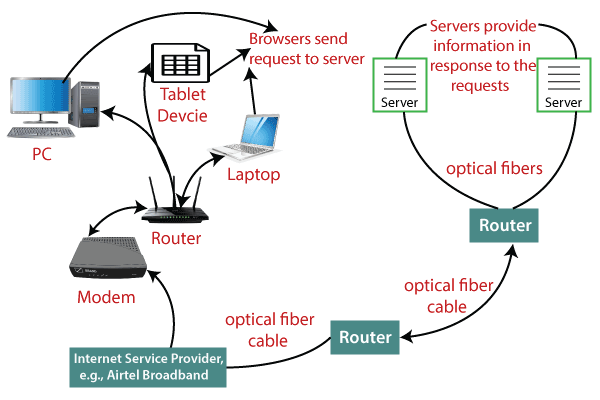
When you turn on your computer and type a domain name in the browser search bar, your browser sends a request to the DNS server to get the corresponding IP address. After getting the IP address, the browser forwards the request to the respective server.

Once the server gets the request to provide information about a particular website, the data starts flowing. The data is transferred through the optical fiber cables in digital format or in the form of light pulses. As the servers are placed at distant places, the data may have to travel thousands of miles through optical fiber cable to reach your computer.

The optical fiber is connected to a router, which converts the light signals into electrical signals. These electrical signals are transmitted to your laptop using an Ethernet cable. Thus, you receive the desired information through the internet, which is actually a cable that connects you with the server.

Furthermore, if you are using wireless internet using wifi or mobile data, the signals from the optical cable are first sent to a cell tower and from where it reaches to your cell phone in the form of electromagnetic waves.

The internet is managed by ICANN (Internet Corporation for Assigned Names and Numbers) located in the USA. It manages IP addresses assignment, domain name registration, etc.

The data transfer is very fast on the internet. The moment you press enter you get the information from a server located thousands of miles away from you. The reason for this speed is that the data is sent in the binary form (0, 1), and these zeros and ones are divided into small pieces called packets, which can be sent at high speed.

Advantages of the Internet:

  • Instant Messaging: You can send messages or communicate to anyone using internet, such as email, voice chat, video conferencing, etc.
  • Get directions: Using GPS technology, you can get directions to almost every place in a city, country, etc. You can find restaurants, malls, or any other service near your location.
  • Online Shopping: It allows you to shop online such as you can be clothes, shoes, book movie tickets, railway tickets, flight tickets, and more.
  • Pay Bills: You can pay your bills online, such as electricity bills, gas bills, college fees, etc.
  • Online Banking: It allows you to use internet banking in which you can check your balance, receive or transfer money, get a statement, request cheque-book, etc.
  • Online Selling: You can sell your products or services online. It helps you reach more customers and thus increases your sales and profit.
  • Work from Home: In case you need to work from home, you can do it using a system with internet access. Today, many companies allow their employees to work from home.
  • Entertainment: You can listen to online music, watch videos or movies, play online games.
  • Cloud computing: It enables you to connect your computers and internet-enabled devices to cloud services such as cloud storage, cloud computing, etc.
  • Career building: You can search for jobs online on different job portals and send you CV through email if required.
Computer Keyboard Shortcut Keys

 In modern times, there is no confusion in saying that computers have become a very useful part of daily life. If you use the computer frequently, you must have knowledge about the computer shortcut keys.

Computer shortcut keys provide an easier way of navigating and performing commands in computer software. The use of shortcut keys is beneficial for computer users, as it allows them to complete tasks accurately and in less time. Furthermore, by using shortcut keys, you can increase your productivity and reduce the strain caused by repetitive motions.

The computer shortcut keys are a set of one or more keys that generate a particular command to be executed. Shortcut keys are generally executed by using the Alt or Ctrl key with some other keys.


Thursday, 2 September 2021

MS Excel 2007 Tutorial


What is Microsoft Excel?

Microsoft Excel is an office use application designed by Microsoft. It comes with Office Suite with several other Microsoft applications, such as Word, Powerpoint, Access, Outlook, and OneNote, etc. It is supported in Windows as well as Mac operating system too.


Worksheet

A worksheet is made of rows and columns that intersect each other to form cells where data is entered. It is capable of performing multiple tasks like calculations, data analysis, and integrating data.

In Excel worksheet, rows are represented by numbers and columns by alphabets.


A single Excel workbook can consist of several sheets, named Sheet1, Sheet2, Sheet3… SheetN. You can add one or more sheets to your Excel document.


Introduction

Text

You will need to know how to insert text and numbers into Excel workbooks to be able to use it to calculate, analyze, and organize data. In this lesson, you will learn how to create a new workbook, insert and delete text, navigate a worksheet, and save an Excel workbook.


Your first workbook

To create a new blank workbook:

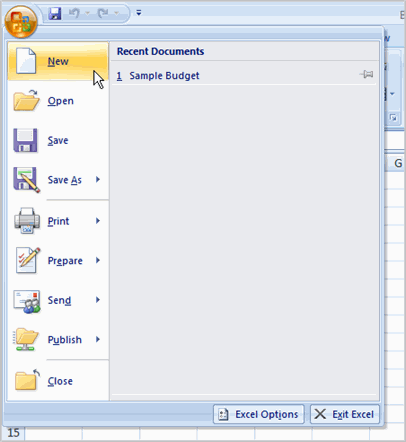
  • Left-click the Microsoft Office button.
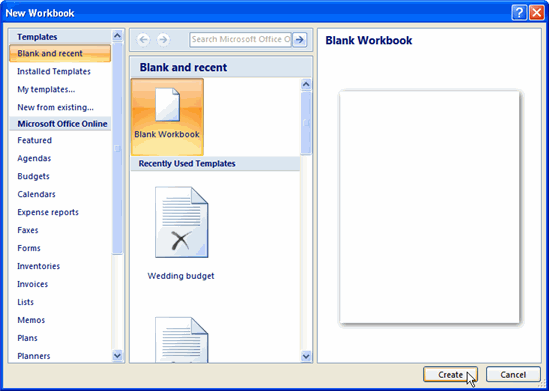
  • Select New. The New Workbook dialog box opens, and Blank Workbook is highlighted by default.
Select New
  • Click Create. A new blank workbook appears in the window.
New Workbook Dialog Box

To insert text:

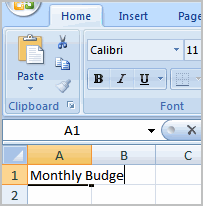
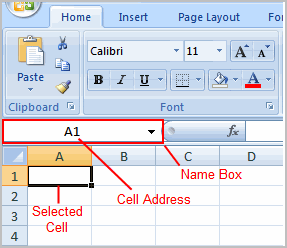
  • Left-click a cell to select it. Each rectangle in the worksheet is called a cell. As you select a cell, the cell address appears in the Name Box.
Select Cell
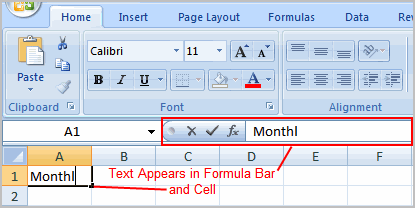
  • Enter text into the cell using your keyboard. The text appears in the cell and in the formula bar.
Insert Text

Cell addresses

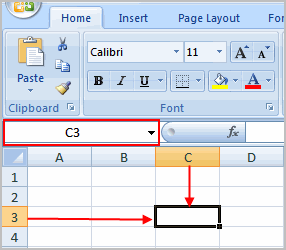
Each cell has a name, or a cell address, based on the column and row where it is located. For example, this cell is C3 because it is where column C and row 3 intersect.

Cell Address

You can also select multiple cells at the same time. A group of cells is known as a cell range. Rather than a single cell address, you will refer to a cell range using the cell addresses of the first and last cells in the cell range, separated by a colon. For example, a cell range that included cells A1, A2, A3, A4, and A5 would be written as A1:A5.

Compatibility mode

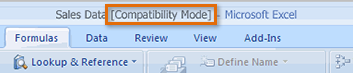
Sometimes you may need to work with workbooks that were created in earlier versions of Microsoft Excel, such as Excel 2003 or Excel 2000. When you open these kinds of workbooks, they will appear in Compatibility mode.

Compatibility mode disables certain features, so you'll only be able to access commands found in the program that was used to create the workbook. For example, if you open a workbook created in Excel 2003, you can only use tabs and commands found in Excel 2003.

Compatibility mode

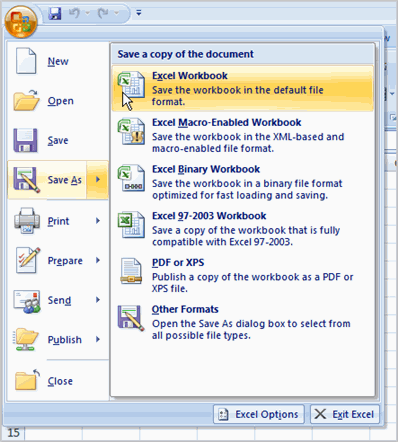
If you want access to all features of Excel 2007, you can save the workbook in the Excel 2007 file format.

To exit Compatibility mode:

  • Click the Microsoft Office button.
  • Select Save AsactionExcel Workbook.
Saving Workbooks

 Modifying Columns, Rows, and Cells

When you open a new blank workbook, the cells, columns, and rows are set to a default size. You have the ability to change the size of each, as well as to insert new columns, rows, and cells as needed. In this lesson, you will learn various methods to modify the column width and row height, as well as how to insert new columns, rows, and cells.

Columns, rows, and cells

To modify column width:

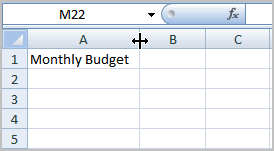
  • Position the cursor over the column line in the column heading, and a double arrow will appear.
Modify Column Width
  • Left-click the mouse, then drag the cursor to the right to increase the column width or to the left to decrease the column width.
  • Release the mouse button.
    OR
  • Left-click the column heading of a column you'd like to modify. The entire column will appear highlighted.